
I was reading a blog by Julia Evans about Docker and reasons why to use containers, and I stumbled upon a phrase she wrote “All software has bugs!”, but is it true?
In this blog, I’ll prove to you that you never wrote a perfect bug-free software in your life, and it gets as simple as your first “Hello, World!”.
Hello, World!
You might think that I’m all talk betting against your precious first application made simply by a print function with fixed-size string, but I’ll show you how I can crash your code.
If you took a Programming 101 class before, whether it was Java, C, Python, or whatever, you should be familiar with code that looks like this, or even, you might’ve wrote code that looked like this!
#!/usr/bin/python3
print("Hello, World!")
And if you run the code,
$ chmod +x hello_world.py
$ ./hello_world.py
Hello, World!
you should see the string "Hello, World!" in your terminal. But what if I told you that even this simple code could be crashed? Well, see this yourself
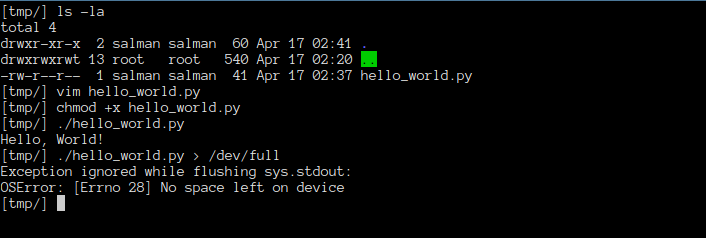
Haha! I crashed your first ever software xPPP
But Why Does This Happen?
This special file in linux /dev/full always acts as a full disk that returns the error ENOSPC indicating no space left on device whenever you try writing to it, and since your software does not check whether there is space left or not to write on, it is prone to crash on full systems.
Then How Do I Write Bug-less Software?
Trust me, I am no one to advise you how to write such perfect software, and I believe no one can, and this is the whole point. The idea isn’t to write bug-free software, rather to write software that acknowledges its environment and can handle errors and act accordingly rather than silently crashing.
In the case of a simple hello world, here’s what I suggest: Error handling.
#!/usr/bin/python
import sys
import errno

try:
    print("Hello, World!")
    sys.stdout.flush()
except OSError as e:
    if e.errno == errno.ENOSPC:
        try:
            sys.stderr.write("Error: No space left on device.\n")
        except Exception:
            pass
    else:
        raise
What this does is:
1. It prints out “Hello, World!” to stdout as usual,
2. explicitly flushes the buffer to guarantee an immediate write,
3. The try/except block acts as a guard: if an error is raised during printing or flushing, it gets caught,
4. if the error is OSError with code ENOSPC, we know we are writing to a full device,
5. we handle the error -in this case by logging to stderr, you might handle it differently.
But wait, this still writes to the disk no matter how you handle the errors, so what did we actually fix?
Nothing. The bug is still there, it will always be there, and there is no way around it either, you literally cannot know if a disk is full without trying to write on it first, and by the time you do, its already too late. What error handling gives you is the control over how badly things go wrong. So instead of the software suddenly dying with no explanation, at least it prints you what happened, then dies XO.
Caveats
A few things I ran into while writing this that confused me at first.
Buffering behaves differently across languages
In Python, print() is line-buffered when writing to a terminal, meaning a newline is enough to trigger a buffer flush, but when you redirect to a file or a pipe like /dev/full, it switches to fully-buffered mode, so nothing actually gets written until you explicitly call flush() or the program exits. This is why I did the sys.stdout.flush() in the fix above.
And C is even more sneaky, if you did this,
#include <stdio.h>

int main() {
    printf("Hello, World!\n");
    return 0;
}
you probably won’t see any error at all, printf buffers the output the same way, but C doesn’t throw exceptions, it returns error codes only -which is always a 0 here, indicating a good run. The ENOSPC hits silently only after when the runtime flushes stdout on program exit, so that the program just dies with a bad exit code and says nothing. To actually catch it in C you’d have to check the return value of fclose(stdout), which, yeah, nobody does that in their first hello world.
But why is there another OSError: [Errno 28] No space left on device besides my except message?
The issue is that sys.stdout.flush() raises the OSError but Python still prints its own traceback on top. You need to also suppress the flush error on exit. The suspicion is that when the script exits, Python tries to flush stdout again and that second flush also fails and goes unhandled, so its kinda going in a faulty printing loop.
You can add this try/except block after printing your error handling message:
try:
    sys.stdout.close()
except Exception:
    pass